View menu actions for Common
Below is an overview of all actions that can be accessed from this menu.
| UI Action Name | Action Name | Description |
|---|---|---|
| Open subviews | `` | |
| Quick view | QuickView | Quickly open a view |
| Disassembly | WindowOpen | Open disassembly view |
| Proximity browser | GraphNewProximityView | Open new proximity browser |
| Generate microcode | mv:GenMicro | |
| Generate pseudocode | hx:GenPseudo | |
| Hex dump | ToggleDump | Open hexadecimal view |
| Address details | AddressDetails | Address details |
| Exports | OpenExports | Open exports window. See subviews for more. |
| Imports | OpenImports | Open imports window. See subviews for more. |
| Names | OpenNames | Open names window. See subviews for more. |
| Functions | OpenFunctions | Open functions window. See subviews for more. |
| Strings | OpenStrings | Open string window. See subviews for more. |
| Segments | OpenSegments | Open segments window. See subviews for more. |
| Segment registers | OpenSegmentRegisters | Open segment registers window. See subviews for more. |
| Selectors | OpenSelectors | Open selectors window. See subviews for more. |
| Signatures | OpenSignatures | Open signatures window. See subviews for more. |
| Type libraries | OpenTypeLibraries | Open types window. See subviews for more. |
| Local types | OpenLocalTypes | Open local type definitions window. See subviews for more. |
| Cross references | OpenXrefs | Open cross references window. See subviews for more. |
| Cross references tree | OpenXrefsTree | Open cross references tree. See subviews for more. |
| Bookmarks | OpenBookmarks | Open bookmarks window. See subviews for more. |
| Open picture | picture_search:open_picture | |
| Notepad | OpenNotepad | Open notepad window to create general notes about the current database. See subviews for more. |
| Problems | OpenProblems | Open problems window. See subviews for more. |
| Patched bytes | PatchedBytes | Open the Patched bytes window. More… |
| Misc. tools | `` | |
| Navigation history | ShowViewNavigationHistory | Navigation history |
| Undo history | ShowUndoHistory | Undo history |
| Graphs | `` | |
| Xrefs to | ChartXrefsTo | Display chart of xrefs to current identifier |
| Xrefs from | ChartXrefsFrom | Display graph of xrefs from current identifier |
| Function calls | xref_graph:FuncCallXrefGraph | |
| Toolbars | `` | |
| Calculator… | Calculate | Open calculator. More… |
| Full screen | FullScreen | Display the current view in full screen |
| Graph Overview | GraphOverview | Display the graph overview if hidden |
| Recent scripts | RecentScripts | Recent scripts |
| Database snapshot manager… | ShowSnapMan | Show the database snapshot manager. More… |
| Increase Font Size | FontSizeIncrease | Increase Font Size |
| Decrease Font Size | FontSizeDecrease | Decrease Font Size |
| Reset Font Size | FontSizeReset | Reset Font Size |
| Print segment registers | ShowRegisters | Print segment registers in the messages window. More… |
| Print internal flags | ShowFlags | Print internal flags in the messages window |
| Print register value | FindRegisterValue | Print register value |
| Hide | Hide | Hide the current function, segment, structure, enumeration or create a hidden range. More… |
| Unhide | UnHide | Unhide the current function, segment, structure, enumeration or hidden range. More… |
| Hide all | HideAll | Hide all functions, structs or enums. More… |
| Unhide all | UnHideAll | Unhide all functions, structs or enums |
| Delete hidden range | DelHiddenRange | Delete the current hidden range, or all hidden ranges in a range. More… |
| Setup hidden items… | SetupHidden | Setup hidden items |
Patched bytes
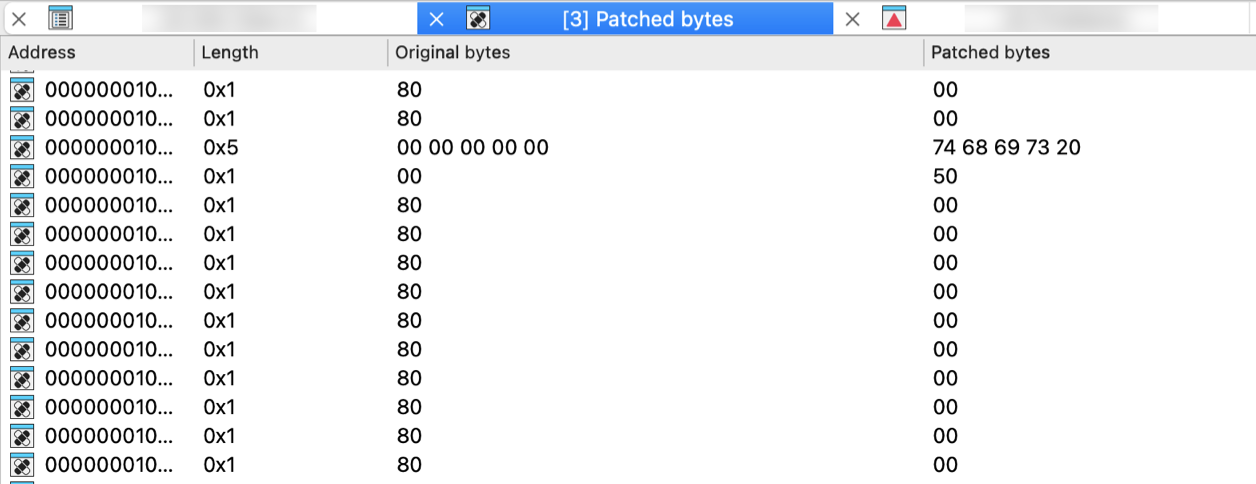
Open the Patched bytes window. The Patched bytes view shows the list of the patched locations in the database. It also allows you to revert modifications selectively.
Reverting changes
Select location(s) and click Revert… from the context menu to revert this modification.
Patching bytes
You can change individual bytes via Edit → Patch program → Change byte….
Calculator…
Open calculator. A simple calculator is provided. You can enter constant C-style expressions. Syntax of the expressions is the same is the syntax of IDC expressions. The result is displayed in the message window in three forms: hexadecimal, decimal and character. All the names created during a disassembly may be used in these expressions. IDA can also pick up the name or number under the cursor and to store it into the input line.
Database snapshot manager…
Show the database snapshot manager. This command shows the database snapshot manager. In this dialog, it is possible to restore previously saved snapshots, rename or delete them.
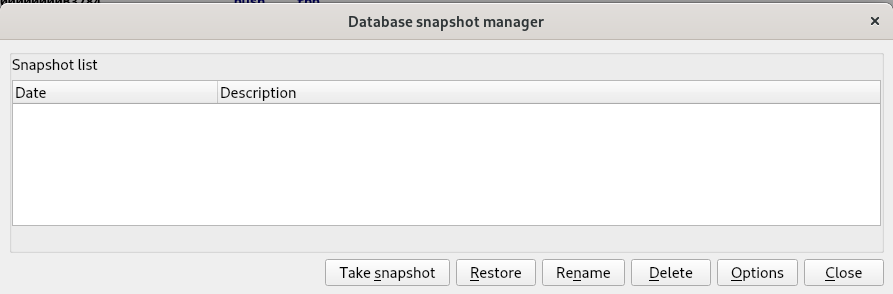
{% hint style=“info” %} Snapshots work only with regular databases. Unpacked databases do not support them. {% endhint %}
Print segment registers
Print segment registers in the messages window. This command displays segment register contents in the output window. You may use this command to refresh the disassembly window too.
Hide
Hide the current function, segment, structure, enumeration or create a hidden range. This command allows you to hide a part of disassembly. You can hide a function, a segment, or create a special hidden range.
If a range is specified, a special hidden range is created on this range.
If the cursor is on the segment name at the start of the segment, the segment will be hidden. IDA will display only the header of the hidden segment.
If the cursor is on a structure variable and if the target assembler has the ‘can display terse structures or the INFFL_ALLASM’ bit on, then the structure will be collapsed into one line and displayed in the terse form.
Otherwise, the current function will be hidden. IDA will display only the header of the hidden function.
If there is no current function then IDA will beep.
If you want to see hidden items on the screen, you may use Unhide command or Setup hidden items… (action SetupHidden) command to display the hidden items. If you want to delete a previously created hidden range, you may use the Delete hidden range command (action DelHiddenRange).
Unhide
Unhide the current function, segment, structure, enumeration or hidden range. This command allows you to unhide a hidden part of disassembly.
This command unhides the element located under the cursor, following these rules:
- If the cursor is on the hidden function name, the function will be unhidden.
- If the cursor is on the terse structure variable, the structure will be uncollapsed and displayed in the regular form.
- If the cursor is on the hidden range, the hidden range will be unhidden.
- If the cursor is on the hidden segment name, the segment will be unhidden.
Hide all
Hide all functions, structs or enums. This command allows you to hide all functions and hidden ranges if invoked in the disassembly window. IDA will display only the header of the hidden items.
If you want to see hidden items on the screen, you may use the Unhide command or Setup hidden items… (action SetupHidden) command.
Delete hidden range
Delete the current hidden range, or all hidden ranges in a range. This command allows you to delete a hidden range of disassembly (previously defined by using the Hide command).