Help menu actions for Common
Below is an overview of all actions that can be accessed from this menu.
| UI Action Name | Action Name | Description |
|---|---|---|
| Online help | ToggleOnlineManual | Use either the online, or bundled IDA manual |
| Help | ShowHelp | Help |
| API Documentation | `` | |
| Python API | HelpPythonAPI | Python API |
| IDA SDK | HelpIDASDK | IDA SDK |
| Decompiler SDK | HelpHexraysSDK | Decompiler SDK |
| IDC Functions | HelpIDCFunctions | IDC Functions |
| About program… | About | About program |
| License manager… | LicenseManager | Open license manager. More… |
| How to buy IDA | BuyIDA | How to buy IDA |
| IDA home page | Homepage | IDA home page |
| IDA support forum | SupportForum | IDA support forum |
| Send database… | hx:SendIDB | Send database |
| Extract function… | hx:ExtractFunc | Extract function |
| Check for free update… | CheckFreeUpdate | Check for free update |
| Report a bug or an issue… | BugReport | Report a bug or an issue |
License manager…
Open license manager. The license manager dialog (Help -> License manager…) lets you pick a license to use IDA with.
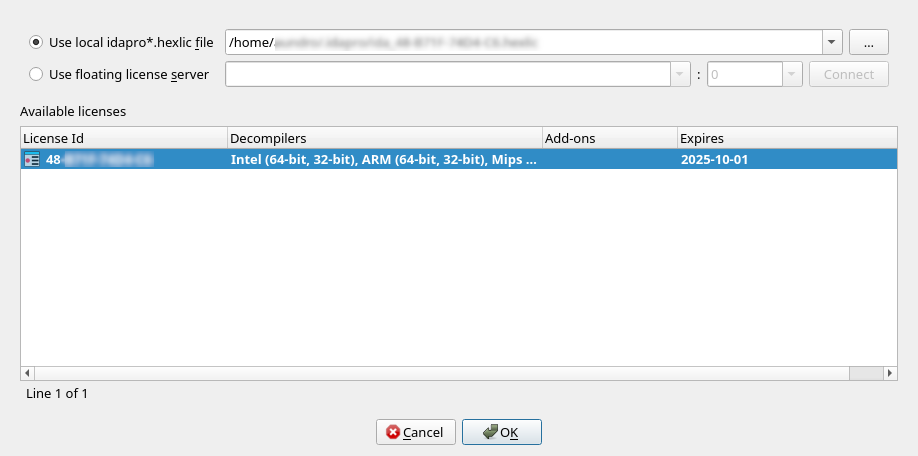
Depending on your licensing plan (e.g., floating), you may have the possibility to switch between various licenses located on the same license server (but having different sets of add-ons & decompilers, for example).
The active license is represented in bold in the list. Double-clicking on a line in the list, will make that license active, and make it the preferred license.
Preferred license
Doing so will also make it the “preferred” license – that is, it will be remembered for later sessions as being the default license to use.
Borrowing & returning licenses
When using floating licenses from a server, it is possible to borrow the license for an extended period of time, thereby allowing offline work. Please use the context menu to achieve that.
License management command line options
IDA recognizes the -Olicense command-line switch, with the following format:
-Olicense:keyfile=<path-to-.hexlic-file>[:setpref]-Olicense:server[:host=<hostname>][:port=<port>][:lid=<xx-xxxx-xxxx-xx>][:setpref]
Where the optional bits are:
keyfile | Path to the license file |
host | The license server host name |
port | The license server port |
lid | The license ID to use |
setpref | Whether the selected license should be remembered as the preferred license |
The command-line switch -Olicense takes precedence over both:
- the preferred license information possibly stored in the registry, and
- the
IDA_LICENSEenvironment variable
NOTE: The -Olicense switch (or IDA_LICENSE)
will not, by default, overwrite the “preferred” license information in the registry.
Specify setpref to achieve that.
NOTE: On Windows, the <DriveLetter>: scheme is recognized.
Therefore -Olicense:keyfile=C:/tmp/my.hexlic:setpref will work as expected.
License management environment variable
Alternatively, the IDA_LICENSE environment variable can be used
to specify licensing information, and accepts the same format
as the -Olicense option
E.g., IDA_LICENSE=server:host=<hostname>:…