Migrating PyQt5 Code to PySide6
Starting from version 9.2, IDA has moved from Qt5 to Qt6. For more details, see the IDA 9.2 Release Notes
PyQt5 vs PySide6
- Different module names;
from PyQt5 import QtWidgetswill no longer work in PySide6. - Differences in Qt libraries themselves
As a result, some existing user scripts may require adjustments. That’s why we prepare PyQt5 shims to ease your transition.
PyQt5 Shims
We have introduced a compatibility layer, called “PyQt5 shims, to support a smooth transition for existing scripts relying on PyQt5.
These shims:
- provide
PyQt5.*Python modules - behind the scenes, re-route calls to PySide6 (Qt6) and perform additional handling to ensure compatibility
The goal is to let your existing PyQt5-based code continue running as it should.
{% hint style=“info” %} Although these shims aim to ease the transition, please note that they have limitations. We recommend porting existing code to PySide6, or using an abstraction layer such as QtPy. {% endhint %}
Enabling/Disabling the Shims
On the first attempt to import PyQt5 (either directly or through a plugin), IDA will display a popup dialog asking whether to enable/disable PyQt5 shims.
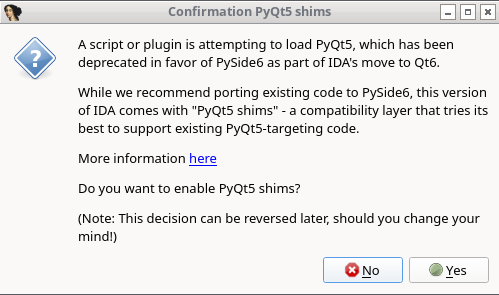
No manual editing is required - simply respond to the prompt.
Your choice will be saved in the configuration file:
- Windows:
%APPDATA%\Hex-Rays\IDA Pro\cfg\idapython.cfg - Linux/macOS:
~/.idapro/cfg/idapython.cfg
The paths depend on IDAUSR.
After making a choice, IDA will:
- Print a message in the Output Window
- Inform you of the updated configuration path
- Remember your choice and not prompt you again
Changing the Shims Preferences
You can edit cfg/idapython.cfg at any time to change the configuration.
To enable PyQt5 shims:
#if __IDAVER__ >= 920
IDAPYTHON_USE_PYQT5_SHIM = 1
#endif
To disable PyQt5 shims:
#if __IDAVER__ >= 920
IDAPYTHON_USE_PYQT5_SHIM = 0
#endif
{% hint style=“info” %}
The #if __IDAVER__ >= 920 directive ensures that the configuration is ignored by older versions of IDA.
However, this is unnecessary if you update idapython.cfg directly within the IDA installation directory.
{% endhint %}
Additional Resources
- Qt5 to Qt6 porting guide - Qt
- Migrate PyQt5 to PySide2 - GeeksForGeeks
- Porting from PySide2 to PySide6 - Qt for Python
- QtPy - Github
Known Limitations
-
QRegExp:
PyQt5.QtCore.QRegExpis deprecated in Qt6- There has already been a replacement -
PyQt5.QtCore.QRegularExpression QRegExpandQRegularExpressionare incompatible. They differ in methods and the pattern syntax. See Qt porting guide for more details.
-
QFontDatabase:
PyQt5.QtGui.QFontDatabaseandPySide6.QtGui.QFontDatabasediffer in the declaration of static methods and in derived methods available onQFontDatabaseinstances- It is marked as deprecated in Qt6